
How should a speaker-and-charger device be used at night?
Talk · Use · Everyday home & office use
How should a speaker-and-charger device be used at night?
Dim or turn off lights, set volume and alarm features before bed, place it on a hard surface with space around it, and keep the phone centred. Disconnect Bluetooth if you don't want notifications through the speaker.
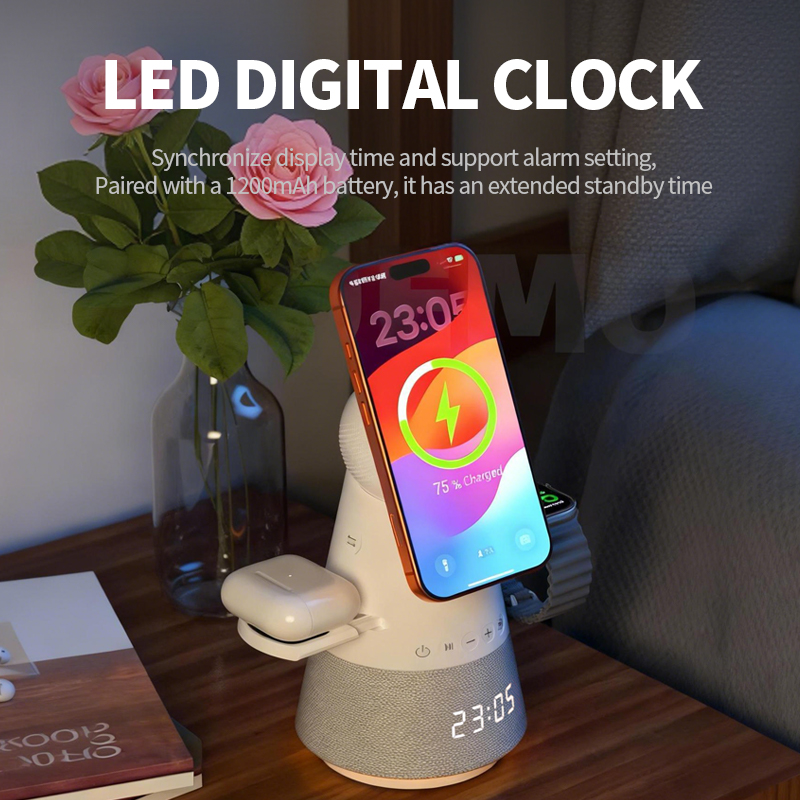
Customers use our speaker charger on their bedside table. Some complain about light and sounds at night. How should they use it?
Short answer: Before bed: dim or turn off indicator lights if the model allows, lower the speaker volume or disconnect Bluetooth to avoid notification sounds, and check any alarm settings. Place it on a hard surface away from bedding, centre the phone on the charging area, and remove thick cases. Use the recommended adapter. Overnight wireless charging is fine in normal use.
Last updated:
Before the first night, test these settings separately
Try the setup once while you are still awake, with the same phone case, adapter and bedside position you expect to use. A charging indicator, a phone notification and an alarm can each come from a different device. Checking all three together makes it easier to tell which setting to change.
- Set the alarm first. Decide whether the phone or the bedside unit will wake you. If the unit has its own alarm, use its controls to check the time, alarm on/off state, and any separate alarm volume or tone setting described in its manual. If you use the phone, set a test alarm a minute ahead and listen with the speaker connected the way it will be overnight.
- Check which device plays notifications. With Bluetooth connected, ask someone to send a test message or call. Try it with your overnight notification settings active. If you want no audio from the speaker, disconnect it and repeat the test while the phone stays on the charger. On iPhone, Apple’s Focus instructions explain how to choose which people and apps can notify you. The test still matters if a contact is allowed through or if you use a separate alarm.
- Check the lights with the room dark. Identify whether the light comes from the phone screen, the unit’s clock display or the charger’s status indicator. Try the controls named in the manual and confirm which light they change. Re-seat the phone once and check whether it triggers another light or sound. If the indicator cannot be dimmed, change the orientation of the unit while keeping its ventilation clear.
- Confirm charging after the other settings are set. Set the phone down as you normally would and check the phone’s own charging indication. If it loses charging when you nudge it, re-centre it and try the setup again without an interfering case or accessory, following the phone and charger instructions. Check that the adapter and cable are the combination specified for the unit before assuming the phone is at fault.
For a quick-start card, give each action its own line: Set your wake-up alarm on the phone or the unit. Check what can play through Bluetooth. Adjust the display or indicator using the controls in the manual. Seat the phone and confirm charging. If a model has no alarm or no dimming control, omit that instruction from its card. If the unit is unplugged or moved, repeat the alarm and charging checks before relying on it overnight.
If you take the unit to a hotel or another room, repeat the test using that outlet and bedside position. Check the alarm again after reconnecting power if the unit relies on mains power to keep its settings. Keep the manual or setup card where you can find it when the controls are hard to see.
Lights
Many speaker chargers have indicator lights or ambient lighting. Check the manual for dimming or switching them off. If there’s no option, place the device so the light doesn’t face the bed.
Sound and notifications
- If the phone stays connected via Bluetooth, notification sounds and calls may play through the speaker.
- Lower the speaker volume before bed or disconnect Bluetooth.
- Use the phone’s sleep or focus mode to silence notifications.
Alarms
If the device has an alarm or radio function, check the time and alarm settings. After a power interruption, settings may need checking.
Placement
- Hard, flat surface such as a bedside table.
- Not on beds, pillows or soft furnishings.
- Space around it for air.
- Away from drinks and water.
Charging
Place the phone centred on the charging area. Remove thick cases and metal accessories. The phone manages charging and may pause near 80% with optimised charging. That’s normal.
Using it as a bedside clock or radio
If the model has a clock or radio, set the alarm volume before bed and check it the first night, so a quiet alarm doesn’t cause a late start.
Adapter
Use the adapter specified in the manual. A weak adapter may cause the speaker and charger to compete for power, leading to slower charging or audio issues.
When to stop using it
- Unusual heat, smell or crackling.
- Visible damage.
- Audio distortion together with heat.
Children’s rooms
For children’s rooms, choose a placement out of reach of young children, keep cables tidy, and consider whether a speaker connected to a phone is appropriate at night. Parents may prefer to disable Bluetooth pairing overnight.
Quick bedtime checklist
Lights dimmed, volume set, phone centred, alarm checked. A short card in the box with this checklist helps users settle into the product quickly.
Confirm with Wecent which light and sound settings each model offers before publishing instructions.
Where this answer says confirm with Wecent, the detail is not published on the product page and has to come from the datasheet or the factory. General facts come from the standards bodies, regulators or device makers named in the text.
Three more perspectives
Products discussed in this thread
Related articles & topics
Have a sourcing question about your own programme?