
2C1A vs 2C2A vs 3C2A: which port layout should a travel charger have?
Talk · Selection · Travel plugs, form factor & materials
2C1A vs 2C2A vs 3C2A: which port layout should a travel charger have?
For most travellers, pick 2C1A: two USB-C ports for a laptop and phone, one USB-A for an older accessory, in the smallest body. 2C2A suits people with two USB-A gadgets; 3C2A is a desk or family charger.
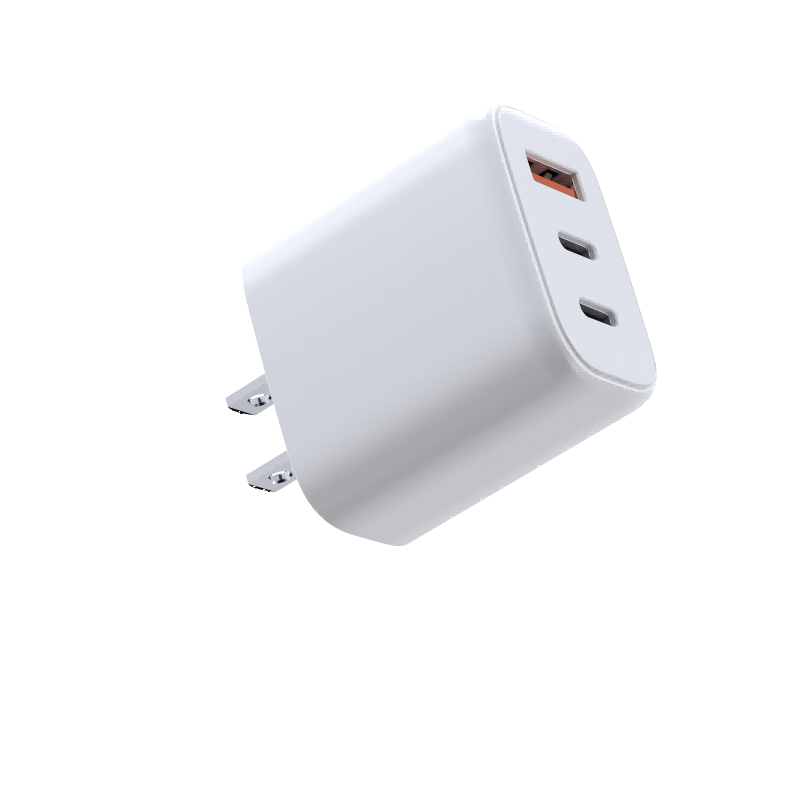
For a travel charger range we can choose between the WET-67-ACC (65W, 2C1A), the WEP-140-CCAA (140W, 2C2A) and the WEG-140W-2A3C (140W, 3C2A). Which layout makes sense, and what is the real difference between 2C1A and 2C2A?
Short answer: For most travellers, 2C1A is the best choice: two USB-C ports cover a laptop and a phone, one USB-A handles an older accessory, and it is the smallest of the three. Choose 2C2A only if users regularly charge two USB-A devices at once. 3C2A is a desk or family charger, usually too big for a light travel kit.
What 2C1A, 2C2A and 3C2A mean
The code counts ports: ‘C’ is USB-C and ‘A’ is USB-A. 2C1A is two USB-C plus one USB-A; 2C2A is two plus two; 3C2A is three USB-C plus two USB-A. A 3C1A model, sometimes searched for, simply adds a third USB-C to the 2C1A layout.
2C1A vs 2C2A vs 3C2A at a glance
| 2C1A | 2C2A | 3C2A | |
|---|---|---|---|
| Devices at once | 3 | 4 | 5 |
| Best for | Solo traveller: laptop, phone, one accessory | Traveller with older USB-A gadgets, or couples | Desk, family or team charging |
| Size | Smallest | Larger | Largest |
| Power sharing | Simplest to explain | More combinations | Most combinations |
| Example in our range | WET-67-ACC 65W | WEP-140-CCAA 140W | WEG-140W-2A3C 140W |
2C1A vs 2C2A: the real difference
Both have two USB-C ports, which do the important work: laptops, current phones and tablets charge fastest over USB-C with USB Power Delivery. The extra USB-A port in a 2C2A only helps if the traveller carries two older USB-A cables, such as a watch puck and earbuds. Most new devices ship with USB-C cables, so that second A port is used less every year, while it still adds size and more power-sharing combinations. That is why 2C1A is our default recommendation for travel and 2C2A is the specialised choice. See the difference between USB-A and USB-C ports on one charger.
Port count is not total power
Every port shares the charger’s total wattage. Plug in a second or third device and the charger redistributes power, so the laptop port may drop. The datasheet’s port-combination table shows what each port delivers in each case; confirm with Wecent for the exact firmware. Background: why a multi-port charger lowers power when a second device is plugged in and why a USB-A port can charge slowly next to USB-C.
When to choose each
- 2C1A: carry-on travel, one laptop plus phone; the best size-to-usefulness balance.
- 2C2A: users with several USB-A accessories, or two people sharing one hotel socket.
- 3C2A: one charger for a desk, family room or shared workspace.
Choosing at 140W specifically? Our separate page on 140W 2C2A vs 3C2A covers that decision. For phone-only ranges, compare 2C1A vs 1C1A.
Where this answer says to confirm with Wecent, the detail is not published on the product page and has to come from the datasheet or the factory. Everything else is general practice and common industry advice, not a test result for a specific model.
Three more perspectives
Products discussed in this thread
Related articles & topics
- How do we choose between a 140W 2C2A and a 140W 3C2A charger?
- Is a 2C1A or a 1C1A the better volume seller for a phone-focused range?
- What is the real difference between the USB-A and USB-C ports on the same charger?
- Why does a multi-port GaN charger lower the power when we plug in a second device?
- Why does a USB-A port charge slowly next to a USB-C port?
- When does a single-port 65W charger beat a 2C1A model for an OEM range?
- Multi-Port Charger Design: The Decisions Before the Layout
Have a sourcing question about your own programme?
Ask our teamMore Travel plugs, form factor & materials questions